Thursday, 19 December 2013

rotoscoping p1

Rotoscoping is a Animation technique where they sketch over real movies to make their animations, they will use actors to get the right movement of the characters, they will use blank backgrounds as they will draw it on as the scene they actually want to so they could draw anything.

Rotoscoping in action-
In the 1930's disney used rotoscoping to capture some of there cartoons. A famous rotoscoped film would be snow white as they went pretty all out on that one. They got a girl trained in Dance to play snow white then they would of traces around the character to get the accurate movements of her body so the cartoons looks legit.

Digital Rotoscoping in Editing-
Instead of drawing out images and backdrops for cartoons people would make 3 dimensional Models and add them into shots at the editing stage and put different objects by using other programs to create the Modelling and then adding actors in front of green screens and put their digital work behind the actors on the green screen.

Character bio P1


Location Recce's


working from AE to Premiere P1

The first easy way is file>export>Media although you will not be able to edit your work by doing this it will make a solid file and a un-editable file. You would either do this by choosing quicktime or another format which is able to be put into Premiere or after effects.

Dynamic link connection. Before doing anything you'll need to save your project so you don't lose your work. After saving you'll need to select all your clips and then right click and Replace with after effects composition then save your project in a different location as a AE Project.

The third way would be a simple select and drag, to me this would be the most useful as you don't need to mess around with any other features although you need have a project already open in after effects to drag the selected clips in there. By Dragging your clips it will duplicate them into the other Program.

Scene Breakdown sheets. P1


File Structure P1

We arranged our Folders into each project.. We are currently working on Project 1.. our Anamatics.

Shot updates/improvement P1


Wednesday, 18 December 2013

Visual Effects Research P1

In our introduction sequence we only will use 3 Visual effects in shot 3, 4 and 5. These will be Felix walking down the corridor and other students will be using there powers, by adding in the effects here we can show the viewer that the college is for people with special powers.

Our first Effect will be a Walk through wall type effect where one person will walk through a wall into a classroom as their power, We can achieve this by using masks to cover up where the person is going to walk into the wall, this effect is pretty basic but if done well can be a really nice touch to our video.

Shot 4 will have someone sprinting fast in like almost a blur this effect i think will look the best out of all 3 as with the right motion blur we can make this really effective, if we just get a clip of someone running then increased the speed and added the blur just on the person we will be able to get a authentic looking visual effect.

The last visual effect We will use will be someone spinning into the floor and appearing somewhere else, to achieve this effect we will Add a motion blur as well as using a mask to make the person disappear i think this could either work really well or not soo well but with practise this could look very nice also depending on how we film the person in the first place.

Matte Paintin'

Matte painting is where a artist will paint a 2 dimensional picture, and the picture will be filmed behind several 3 dimensional elements to give it depth. Its a alternative to the green screen although this method does not need extra editing after filming the raw footage because the background is filmed and not put in at the editing stages.

In 1905 Norman Dawn developed the technique so he could combine a photograph and painting to improve the environment taken by the camera. Films in the 1900's have been using Matte painting before green screening there was no Chroma keying software about, so being able to film a scene or shot with the background already painted in was the main option for many film producers.


Star Wars was notorious for using Matte painting especially as their sets where space stations with different futuristic vehicles, planets, futuristic cities such as Coruscant and big space which wouldn't be available by using sets. Lucasfilms really managed to make the matte painting in the star wars saga work, it was very well done as adding a good bit of depth to the painting it really made each location really look like a futuristic star ship should(if they should make star ships in the future)

Tuesday, 17 December 2013

Cinematography analysis First + Improved p1

12 Good/Bad Shots 
This Shot is good as it has leading lines you start from the path at the front which leads you into the college, the bar of white also leads your eyes to the entrance of the college and also the middle of the frame.
This shot has a mixture of good and bad elements, although the leading lines down the middle of the frame this is not needed as we have no intention of the viewer to be looking at the bottom of the corridor but at the student using their power. I also find the radiators a bit distracting and they're unneeded although there is nothing we could do about them.
I think this is a good shot although the subject is in the middle of the frame and not at a offset we can really focus on the characters clothing and the character is the first thing we look at before anything else in the shot as we really didn't need the viewer to look anywhere.
This is a bad shot, totally out of focus and there is no space in front of the characters for them to move, if we where to retake this shot we would balance out the characters in the shot so there was no negative space.
Although there is no moving space in this and a lot of negative space we really captured the emotion on the characters face.
This was a bad shot out of shot and cluttered with unneeded objects.
the diagonal angle on this shot really makes it a nice piece also how the elements of the shots are balanced out.
This is another bad shot, although the shot is %100 in focus on the character which is meant to be in focus. the angle the picture is taken at is really off and there is clutter/distractions in the shot in the negative space which really makes the shot look bad.
This shot is good although the subject is not at a offset having it at the centre with a plain background makes a nice portrait shot of the character. The blue board adds another element to the picture which contrasts with the white background, The colour could represent the characters feeling or mood.
This shot is way too cluttered and is not nice too look at the character if at an offset would look a lot better than centre and have a lot of negative space full of distractions is not a good look.
This shot is full of random elements such as the projector on the ceiling which is very ugly and the random posters in the background, even the colours of the chairs makes this shot look bad.
This shot although is cluttered with random objects is very good we can see the characters stern look and we can see the side of the other characters face and just that little bit of face we can almost tell their emotion looking back at the other.

Photo Anamatic P1

Tuesday, 10 December 2013

Anamatic review P1


Animatic peer feedback from Casper Brazier
1. SHOT LENGTH - My ASL was over 3 seconds so we added and extra 8 shots in to the video to make sure our ASL was near to hollywood standard.
2. CAMERA MOVEMENT - Camera movement was good when needed, although shots could of taken more photographic features to make them better to look at although when we actually film the clip we will take that into consideration and get nice shots which will look good at any frame.
3. SOUND LEVELS - Sound levels were okay, i really needed to add some ambient sound and some better foley sounds to make sure my audio was up to scratch with no silent points as there will always be background noise.
4. VOICE ACTING - Voice acting was spot on, clear and we had no problems using a zoom mic, although when filming the actual video we will need to find a way to get the zoom mic in the scene as recording afterwards then syncing the audio in some kind of editing software(AE/premiere) we would never get a perfect sync to the actors mouths. 
5. VFX - VFX was good as i could really photo manipulate the photos taken and composite bits out of the shots. i could also added special filters to make the Video effects to look a lot better. 
 6. PEER FEEDBACK -  Overall i will really need to work on my sound and my camera movement and angles as without the right angles my shots will not look good and will drag the quality of the filming down a lot. Also from peer feedback we found we had to update our ASL which will help our filming look more to hollywood standard.

Professor Albatross character P1


Costume design P1

Tweed suits and professor gowns, Proffesor albertross is a Typical Proffesor, and also has a slightly old look to him and his clothes, he is a posh man.

Moodboardin'

This is the moodboard for Proffesor Albertross, i included cups of tea and coffee as teachers love that stuff.

Sunday, 8 December 2013

Green screen P1

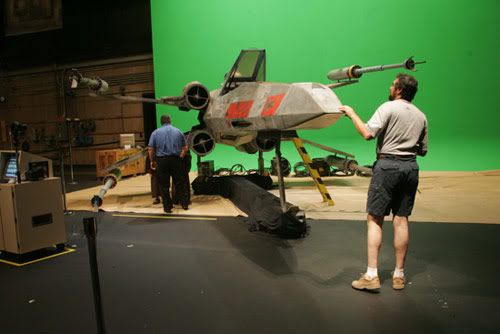
Nicknamed "Green screen" the chroma key method is a way of compositing different video layers which can make an effect that the characters are in a different environment. They use Green or sometimes blue to try to completely get a clean compositing layer to put the characters on.

The first Chroma keying was used in the 1930's originally on a blue screen, RKO Radio pictures and was used to create wipe transitions like wind-wipers. Although the method was mainly used on films it caught onto television shows very quick, as they could create landscapes without having to go outside sign any safety forms and not have to pay for any extras in the background so it was very cheap and easy to use a green screen in TV. A very well known used chroma key effect in the TV show Doctor Who, The Tardis uses a green screen to get the effect that the Tardis is a big teleporter.
 Star wars used a lot of green screening in the first few episodes as they couldn't film in space and get those sorts of backgrounds they would have to be computer generated then put on after by compositing it using a green screen, although chroma keying was used in the newer episodes it was reduced as CGI Animation takes over the chroma keying method so there is a lot less of the method going on in movies and more in TV shows as its cheaper.

Thursday, 28 November 2013

storyboard.


Production meeting #2 P2

In our second production meeting we tried to get our scene 1 shot 3 effect walking through a wall, We vaguely knew how we were going to achieve the effect but we did not know how it was going to pan out. Firstly we went to the corridor where we were going to shoot the shot, we filmed 3 shots of each of us running into a wall, We thought this would work. When we got to After Effects it turned out that due to people in the background we could not mask ourselves into the wall as our shot even without ourselves in the shot would have someone in the background. We ended up Re-filming the shot without any background people this worked and we were able to mask edwyn into the wall.
We could have improved how he masked into the wall as there was a line where you could see the layer had been cut, We could of updated this with a blur or a Stock Effects video which would disguise the line. So we decided we need to learn a bit more about the AE effects and more about masks then we will be able to perfect the effects and how good they look.
This is the shot as you can see the line makes the effect look tacky so if i was to add a feathering effect to the Line it would be more legit.
This is with a feathered/blur effect it looks a lot more legit.

Tuesday, 26 November 2013

visual effects test footage p1


I chose to make edwyn disappear through a wall, although this could be enhanced even more to make it  look more legit this was well for what we did.

Effect sheet


Tuesday, 19 November 2013

Team discussion/master shot list discussion P1

We have discussed all our shots, we have decided to each choose different shots of each of the group members ideas for each shot, and when we come to writing up the master shot list we will each decide on one of our ideas. we each have good ideas for each shots. we have also decided on a few script changes. we have only chosen to do visual effects on shot 3, as most of our first scene is dialog. Shot 3 can contain many students with different powers so we can use 3 visual effects in that shot. A few of our shots are pretty boring as it is just plain dialog, although it sets the rest of the story, and describes to the viewers what the college is.

180 Degrees Rule. P1

THE 180 DEGREE RULE 


The 180 degree rule (Axis of action) is a rule  which a camera man follows by when filming 2 person conversation, this is used so that the viewer does not get confused with whats going on during the scene. As shown in the picture, if filming head on at the actors the blonde actor will always be on the left and the brunette on the right, if switched round to the other side the blonde actor is now on the right and the brunette on the left.


Monday, 18 November 2013

Face Warp p1

http://www.youtube.com/watch?v=-RNYcRmgS-s
Face warp, pretty weird.

point break sound P1

 The sound for the clip of pointbreak we had was pretty easy to create, was mostly looping the samples we had, although the samples were not very good our sound was still effective. We used a running sample to get the base sound as it also added ambients toward the sound, then for the explosion a loud explosion sound which worked well, although samples for explosions are often not very good quality, then a variety of glass breaking, falling over samples for the last bit of the clip.
We could've improved this by making our own foley sounds to create a more real sample to use for each sound then we could've imported more downloaded ambient sounds off the internet as they didnt matter as much as the sound effects.

Tuesday, 12 November 2013

Tweetpitch

My Hero is John although he doesn't really help anyone but himself, he is also the main character. John has no Friends so he goes on a search for friends this is how the story starts and also how he gets into trouble. his new opportunity is the witch which is also his problem, as he thinks the witch can help him with his social difficulties but no she turns him into a slug. his goal is to turn himself back but he needs to find out how to. The conflict is with the witch as she turned him into a slug. #TWEETPITCH

Tweetpitch

My Hero is John although he doesn't really help anyone but himself, he is also the main character. John has no Friends so he goes on a search for friends this is how the story starts and also how he gets into trouble. his new opportunity is the witch which is also his problem, as he thinks the witch can help him with his social difficulties but no she turns him into a slug. his goal is to turn himself back but he needs to find out how to. The conflict is with the witch as she turned him into a slug. #TWEETPITCH

timeline of X-Men 1 Sound p1

The sound on This first clip of x-men 1 was pretty hard to put into a timeline as professor x kept on stopping so i had to keep making new blocks for his colour.

Sunday, 10 November 2013

Short story p1

John in a boy who never really had friends but then he moved to the city, the city is dangerous and he must be careful of not using his knife fingers to cut people in the street. John could also talk to Slugs, but he would always chop them in half with his knife fingers. when he starts college he meets a boy, Henry, who could transform into a slug or any other kind of gastropods, as John had trouble talking to people he would ask Henry to morph into a slug when he wanted to talk to him, Henry didn't like this and he quickly got fed up with having to use his humiliating power all the time just to talk to one of his mate. Henry did understand that John had no other friends but this was killing him from the inside out he couldn't do it any more. John had quickly lost his best friend and only friend, he had to do what he could to save his friendly relationship with Henry. John worked out that if he could start speaking to Henry in his normal human form he would not have to change into a slug all the time and get angry so John started on improving his social skills, but John was impatient he needed to do it quick so he went to the college witch to get spells placed upon himself. The college witch was evil towards John she didn't like his dangerously sharp knife fingers so she made John into a slug. John now as a slug he had to find Henry and show him what he had become, although now John was a slug he could not talk to humans but to other slugs. John knew if he caught Henry as a slug he would be able to get out of the whole problem but Henry did not like being a slug. For the next few days John stayed in Henry's backpack hoping that he would get found. John did get found but Henry didn't know what to do with a slug in his backpack what would any normal person do chuck him out, so Henry did he threw John into some dirt. John knew the only way to get back was through the college witch so he went a killed the witch and lifted the spell. Johns life had changed he now had lots of friends and didn't have to worry about being sad any more.

Friday, 8 November 2013

top trumpington


drive sound effects P1


Drive Sounds.

Sound is very important in many different ways to create many different features to each scene of the movie.  Diegetic sound is just as important as non-diegetic sound to create tension, As the Watch ticks this gives us an idea of the time and how tight time is, and if the robbers run out of time they do not succeed in their robbery. The radio also adds a great deal of importance of diegetic sounds it tells us where the police are and how far away they are, which increases tension. Diegetic sound does not always increase tension it can also relieve tension. The basketball game on the radio shows that Ryan gosling as the get away driver at the same time is not too fussed about the robbery and that these get always are casual for him, but we find out later that he needed to be tuned into the game as he parks in the car park of the stadium and comes out as a basketball fan.


Sound Effects play a big part in adding tension and relieving tension in the scene.
The ticking of the watch sets almost like a tempo which alerts the time and that they’re running out of time due to the 5 minute rule, if the robbers aren’t back in the car with in the time limit Ryan gosling will drive off.  The Radio scanner allows us to know where and how far the Police are away from the Robbery, this increases tension but when Ryan Gosling turns the radio to the Basketball game it seems more casual so we don’t think that its that tense in the scene as Ryan Gosling isn’t bothering about the police.  All the time there is outside sounds like police sirens, car horns these all make us aware of the surrounding happenings, which in some cases can increase tension like the sirens as we are aware police are on their way.

Thursday, 7 November 2013

misfits P1

Misfits- The purpose of dialog.
In the first couple of minutes of the 1st series of misfits we meet the characters, and immediately recognise there personality and characteristics of the characters, each character with different trait can give an effect on each person, personalities clash and that causes problems. Through the characters costume design

From the first couple of scenes we can see that Nathan is a cheeky personality, he mocks people and does not think about consequences or he will mock someone where he knows if they start aggression they will be stopped as in the scene with the probation officer he knows the officer will stop any aggression as he does.

 Gary is a character which plays the roll of the ‘badman’ lower class person. he quickly shows his aggressiveness in his first sentence ‘are you looking to get stabbed’ this automatically gives us as viewer the impression that he isn’t afraid of being in danger. Threatening Nathan without evening knowing him means Gary is a unfriendly person. His smug face shows confidence which reflects his rude behavior We can relate Gary and Kelly to both being your average low class people, with rude and immature behavior.

Simon is a very important role in misfits. Throughout the first scene Simon doesn't really talk but when he did he used a quite and soft voice which gives us the impression that he is shy. As we start to build up confusion to why he is here. Low and quite voice perhaps means Simon is scared and uncomfortable with his surroundings. Simons stands way away from everyone else, He clearly does not want to be there and his shyness has taken over control in how he acts.
 Curtis is not afraid to say anything as he knows no one would start on him, he thinks thats he's better than everyone in the group this comes across to us from what he says, Whilst we get a street/urban feel from his accent, and how he acts.

 Alisha likes herself, she clearly is a bit up herself. we could also say she is a "slag" She thinks too highly off herself, and will show off her assets to get attention from boys.

 Kerry is a stereotypical chav she is in a low class family and lives in a bad place. she will take offence most statements, Nathan just picks on her for her voice and she reacts very badly to this, Kerry is a very bad tempered character which is portrayed in her actions and her scripted speech.

Tuesday, 22 October 2013

After effects editing P1

Colour correction.
First screenshot - waveform
second screenshot - vectorscope
third screenshot - RGB parade
Each view of the colours in different forms


Thursday, 17 October 2013

D-Day with mobas

D-Day with MOBAS
MOBAS is a company which helps brands and other companies make advertisment plans, they do this through using social media, making designs for the brands and overall help the brand. These Marketing plans will help the brands sell more of what they do.

On the day we had a chat with two people from MOBAS they described to us who they where and what they did then they set us a challenge of designing a brand and its marketing scheme, we where told there would be a national price but they did not tell us what that was so we really weren't too motivated.

I learnt that there are actually companies such as MOBAS to design Marketing and advertisement schemes for other brands. I thought brands would be able to do that themselfs.


Friday, 4 October 2013

wallpaper

Shoe wallpaper.
 Although there is clear lines in the pattern i wanted to make that illustration clearer than the others. Therefore i didn't mind the lines. to create each Illustration i used illustrator and to create the tiled piece i  made the image a pattern in photoshop, by selecting the fill-pattern tool.

Thursday, 3 October 2013

Salmon toe Illustration.

Favourite piece of design so far. 

If i had to choose so far it would be the Asics x Ronnie Fieg Gel Lyte III Illustration. This is because it was a very clean piece, it took me a while to do but it was time well spent as the finished product was great and looked so alike to the actual shoe. This Design could also be updated with extra time added i could add extra detail on the shoe.