Thursday, 19 December 2013

rotoscoping p1

Rotoscoping is a Animation technique where they sketch over real movies to make their animations, they will use actors to get the right movement of the characters, they will use blank backgrounds as they will draw it on as the scene they actually want to so they could draw anything.

Rotoscoping in action-
In the 1930's disney used rotoscoping to capture some of there cartoons. A famous rotoscoped film would be snow white as they went pretty all out on that one. They got a girl trained in Dance to play snow white then they would of traces around the character to get the accurate movements of her body so the cartoons looks legit.

Digital Rotoscoping in Editing-
Instead of drawing out images and backdrops for cartoons people would make 3 dimensional Models and add them into shots at the editing stage and put different objects by using other programs to create the Modelling and then adding actors in front of green screens and put their digital work behind the actors on the green screen.

Character bio P1


Location Recce's


working from AE to Premiere P1

The first easy way is file>export>Media although you will not be able to edit your work by doing this it will make a solid file and a un-editable file. You would either do this by choosing quicktime or another format which is able to be put into Premiere or after effects.

Dynamic link connection. Before doing anything you'll need to save your project so you don't lose your work. After saving you'll need to select all your clips and then right click and Replace with after effects composition then save your project in a different location as a AE Project.

The third way would be a simple select and drag, to me this would be the most useful as you don't need to mess around with any other features although you need have a project already open in after effects to drag the selected clips in there. By Dragging your clips it will duplicate them into the other Program.

Scene Breakdown sheets. P1


File Structure P1

We arranged our Folders into each project.. We are currently working on Project 1.. our Anamatics.

Shot updates/improvement P1


Wednesday, 18 December 2013

Visual Effects Research P1

In our introduction sequence we only will use 3 Visual effects in shot 3, 4 and 5. These will be Felix walking down the corridor and other students will be using there powers, by adding in the effects here we can show the viewer that the college is for people with special powers.

Our first Effect will be a Walk through wall type effect where one person will walk through a wall into a classroom as their power, We can achieve this by using masks to cover up where the person is going to walk into the wall, this effect is pretty basic but if done well can be a really nice touch to our video.

Shot 4 will have someone sprinting fast in like almost a blur this effect i think will look the best out of all 3 as with the right motion blur we can make this really effective, if we just get a clip of someone running then increased the speed and added the blur just on the person we will be able to get a authentic looking visual effect.

The last visual effect We will use will be someone spinning into the floor and appearing somewhere else, to achieve this effect we will Add a motion blur as well as using a mask to make the person disappear i think this could either work really well or not soo well but with practise this could look very nice also depending on how we film the person in the first place.

Matte Paintin'

Matte painting is where a artist will paint a 2 dimensional picture, and the picture will be filmed behind several 3 dimensional elements to give it depth. Its a alternative to the green screen although this method does not need extra editing after filming the raw footage because the background is filmed and not put in at the editing stages.

In 1905 Norman Dawn developed the technique so he could combine a photograph and painting to improve the environment taken by the camera. Films in the 1900's have been using Matte painting before green screening there was no Chroma keying software about, so being able to film a scene or shot with the background already painted in was the main option for many film producers.


Star Wars was notorious for using Matte painting especially as their sets where space stations with different futuristic vehicles, planets, futuristic cities such as Coruscant and big space which wouldn't be available by using sets. Lucasfilms really managed to make the matte painting in the star wars saga work, it was very well done as adding a good bit of depth to the painting it really made each location really look like a futuristic star ship should(if they should make star ships in the future)

Tuesday, 17 December 2013

Cinematography analysis First + Improved p1

12 Good/Bad Shots 
This Shot is good as it has leading lines you start from the path at the front which leads you into the college, the bar of white also leads your eyes to the entrance of the college and also the middle of the frame.
This shot has a mixture of good and bad elements, although the leading lines down the middle of the frame this is not needed as we have no intention of the viewer to be looking at the bottom of the corridor but at the student using their power. I also find the radiators a bit distracting and they're unneeded although there is nothing we could do about them.
I think this is a good shot although the subject is in the middle of the frame and not at a offset we can really focus on the characters clothing and the character is the first thing we look at before anything else in the shot as we really didn't need the viewer to look anywhere.
This is a bad shot, totally out of focus and there is no space in front of the characters for them to move, if we where to retake this shot we would balance out the characters in the shot so there was no negative space.
Although there is no moving space in this and a lot of negative space we really captured the emotion on the characters face.
This was a bad shot out of shot and cluttered with unneeded objects.
the diagonal angle on this shot really makes it a nice piece also how the elements of the shots are balanced out.
This is another bad shot, although the shot is %100 in focus on the character which is meant to be in focus. the angle the picture is taken at is really off and there is clutter/distractions in the shot in the negative space which really makes the shot look bad.
This shot is good although the subject is not at a offset having it at the centre with a plain background makes a nice portrait shot of the character. The blue board adds another element to the picture which contrasts with the white background, The colour could represent the characters feeling or mood.
This shot is way too cluttered and is not nice too look at the character if at an offset would look a lot better than centre and have a lot of negative space full of distractions is not a good look.
This shot is full of random elements such as the projector on the ceiling which is very ugly and the random posters in the background, even the colours of the chairs makes this shot look bad.
This shot although is cluttered with random objects is very good we can see the characters stern look and we can see the side of the other characters face and just that little bit of face we can almost tell their emotion looking back at the other.

Photo Anamatic P1

Tuesday, 10 December 2013

Anamatic review P1


Animatic peer feedback from Casper Brazier
1. SHOT LENGTH - My ASL was over 3 seconds so we added and extra 8 shots in to the video to make sure our ASL was near to hollywood standard.
2. CAMERA MOVEMENT - Camera movement was good when needed, although shots could of taken more photographic features to make them better to look at although when we actually film the clip we will take that into consideration and get nice shots which will look good at any frame.
3. SOUND LEVELS - Sound levels were okay, i really needed to add some ambient sound and some better foley sounds to make sure my audio was up to scratch with no silent points as there will always be background noise.
4. VOICE ACTING - Voice acting was spot on, clear and we had no problems using a zoom mic, although when filming the actual video we will need to find a way to get the zoom mic in the scene as recording afterwards then syncing the audio in some kind of editing software(AE/premiere) we would never get a perfect sync to the actors mouths. 
5. VFX - VFX was good as i could really photo manipulate the photos taken and composite bits out of the shots. i could also added special filters to make the Video effects to look a lot better. 
 6. PEER FEEDBACK -  Overall i will really need to work on my sound and my camera movement and angles as without the right angles my shots will not look good and will drag the quality of the filming down a lot. Also from peer feedback we found we had to update our ASL which will help our filming look more to hollywood standard.

Professor Albatross character P1


Costume design P1

Tweed suits and professor gowns, Proffesor albertross is a Typical Proffesor, and also has a slightly old look to him and his clothes, he is a posh man.

Moodboardin'

This is the moodboard for Proffesor Albertross, i included cups of tea and coffee as teachers love that stuff.

Sunday, 8 December 2013

Green screen P1

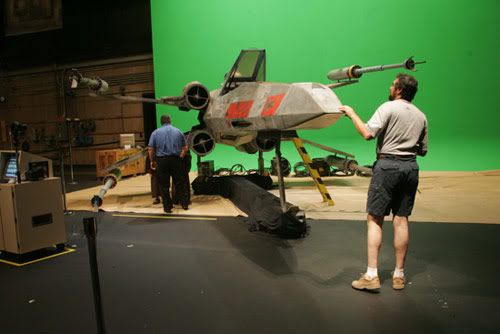
Nicknamed "Green screen" the chroma key method is a way of compositing different video layers which can make an effect that the characters are in a different environment. They use Green or sometimes blue to try to completely get a clean compositing layer to put the characters on.

The first Chroma keying was used in the 1930's originally on a blue screen, RKO Radio pictures and was used to create wipe transitions like wind-wipers. Although the method was mainly used on films it caught onto television shows very quick, as they could create landscapes without having to go outside sign any safety forms and not have to pay for any extras in the background so it was very cheap and easy to use a green screen in TV. A very well known used chroma key effect in the TV show Doctor Who, The Tardis uses a green screen to get the effect that the Tardis is a big teleporter.
 Star wars used a lot of green screening in the first few episodes as they couldn't film in space and get those sorts of backgrounds they would have to be computer generated then put on after by compositing it using a green screen, although chroma keying was used in the newer episodes it was reduced as CGI Animation takes over the chroma keying method so there is a lot less of the method going on in movies and more in TV shows as its cheaper.